
Turnkey telephony.
Powered by AI.
Desktop and web phones, automatic AI transcription and instant team feedback, fully integrated with Ave products and AI. One solution to help your team handle calls and follow-up more efficiently.
An illustrative call route
- Automatic AI transcription
- Instant team feedback
- Integrated Ave ecosystem
The intelligence behind the conversation
A call becomes text.
Feedback becomes
a better next step.
Give team members useful context while the conversation is still fresh. AveVoice brings automatic transcription and instant AI feedback into the way your team handles calls.
Automatic AI transcription
Turn phone conversations into written transcripts your team can review, refer to and use for follow-up.
Instant feedback for your team
Help team members see what went well, which details need attention and how to make the next conversation more effective.
Desktop and web phones, connected
Keep calling fully integrated with Ave products and AI, from the phone your team uses to the work that follows.
Automatic AI transcription
“We need shared follow-up across our three clinics. Can you send a proposal next week?”
“Yes. I’ll outline the setup and arrange a demo before we plan onboarding.”
Instant AI feedback
The call established the scope and a follow-up commitment. Confirm the team size and a specific proposal date to make the next step clear.
Suggested next step
Prepare the three-clinic proposal and confirm a demo time with Hana.
Inside the product
From the first ring
to the next action.
Configure the calling experience around your teams, opening hours and responsibilities.
- 01
Desktop and web phones
Handle calls from your desktop phone or browser, with hold, mute, waiting calls and keypad tones. Use direct or attended transfers to bring in the right colleague.
- 02
Set the route callers follow
Configure incoming and outgoing rules, uploaded greetings, keypad menus, office hours, holidays and fallback destinations.
- 03
Give queues a working rhythm
Manage distribution, member availability, pause and wrap-up. Configure waiting limits, announcements, overflow and callbacks.
- 04
Keep recordings and voicemail accessible
Set recording policies, mailbox greetings and access. Authorized users can review recordings in the browser and access voicemail from the browser or their phone.
- 05
Keep the team connected
Use personal and shared contacts, presence and team messaging alongside call history. Review date-range reports and export records.
- 06
Manage the system behind the calls
Administer users, extensions, device provisioning, roles and multifactor authentication. Set storage controls and scheduled backups.
Inside AveVoice
Your greeting.
Your menu.
Your next destination.
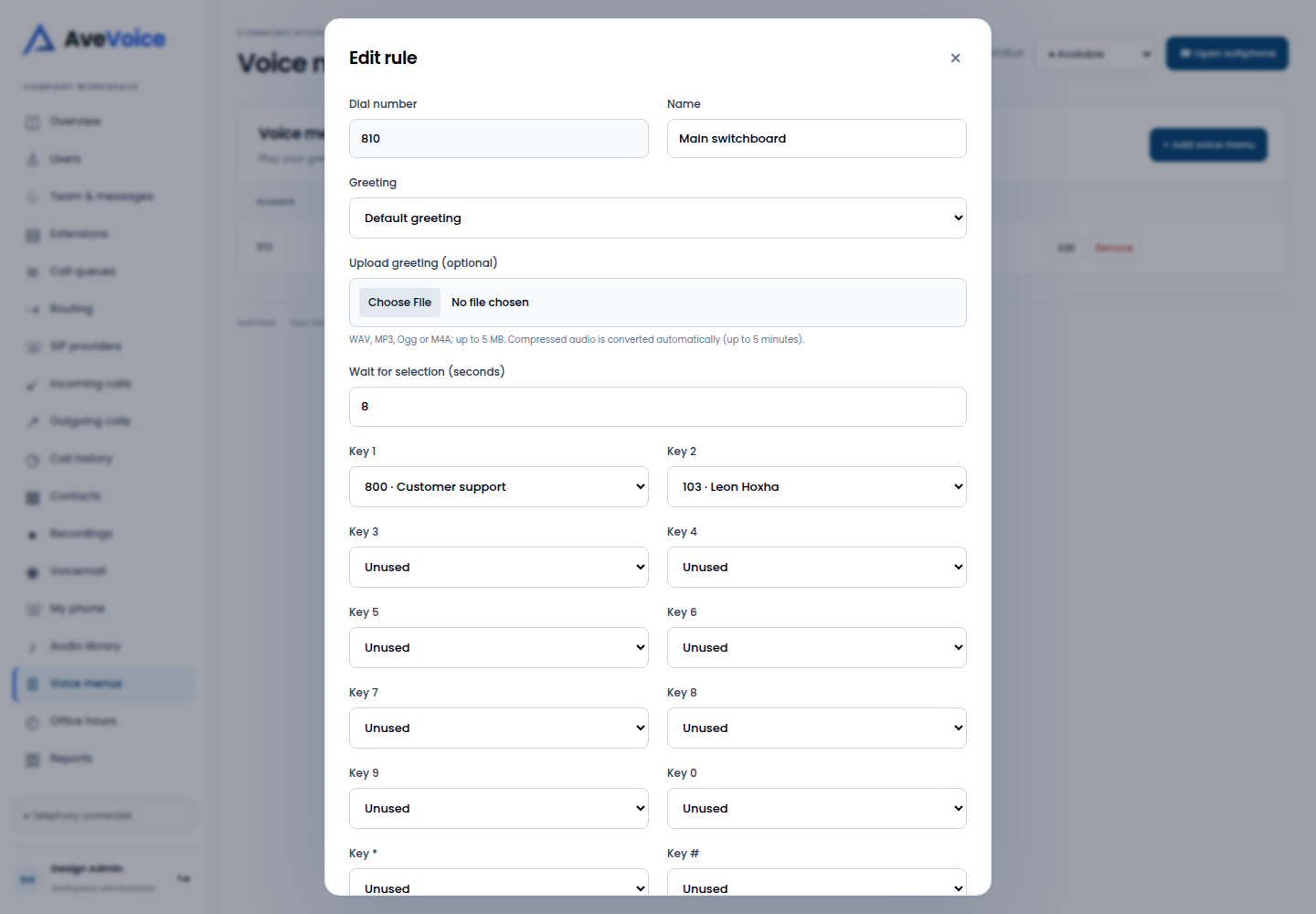
Choose the greeting callers hear, set the wait for a selection and map the keypad choices to the destinations your team needs.
- Route a choice to a queue or extension.
- Upload the greeting that fits your organization.
- Agree the fallback when nobody answers.
Fully integrated with Ave products & AI
The conversation.
The context. The follow-up.
Your desktop and web phones are part of the Ave ecosystem. Connect calling, transcription and AI assistance to the products your team uses, so a conversation can lead to a clear next action.
One connected workflow
Connect the conversation to the team, the customer context and the next step.
Implemented with StarLabs
Make it part
of your working day.
A turnkey solution for telephony efficiency. We bring the calling setup, Ave integrations, AI, training and support together, then test the complete workflow with your team.
- 01
Plan the calling setup
Confirm your provider, phone numbers, team and desktop or web phones.
- 02
Define the caller’s route
Map office hours, holidays, voice menus, queues and unanswered-call destinations.
- 03
Connect Ave and the AI workflow
Set up Ave product connections, automatic transcription and team feedback, with the access and call policies your organization needs.
- 04
Test, train and hand over
Test call paths and transfers, practise the team’s workflow and agree ongoing support.
Diagnose → Design → Implement → Train → Support
A closer look
Before you get started.
See AveVoice in your workflow
Bring your team’s process.
We’ll walk through the product.
Tell us who will use it, what needs to connect and the task you want to improve.